Installs flexibly on ceiling or wall using optional mounts including ET-WBC100, a lightweight wall-mount system that ships partially preassembled for easy installation. The PT-CMZ50 image adjustment is easily performed via remote control using Digital Zoom Extender and Image Shift function and powered focus. Stylish body and quiet 26 dB operation blends easily into your space, limiting distractions.
Project Large Images in Rooms with Limited Space
Big Pictures with Fewer Shadows
Share large 80–120-inch images in rooms of any size, from small huddle rooms to hybrid classrooms where installation space on the ceiling is limited. The compact ultra-short-throw design can deliver an 80-inch image from a distance of about 1 cm (1/3 in.)1. Since the lens is forward of the presenter, shadowing and dazzling are reduced so everyone can communicate comfortably. The large picture and detailed WUXGA resolution make it ideal for displaying small text.

Stylish Design Harmonizes with Your Space
The projector’s minimal screen offset makes it a practical choice for rooms with low ceilings, where it installs almost flush to the wall. Available in black or white, its integrated body has no protrusions to spoil a clean, elegant style that harmonizes with any interior design. Installed in an office, classroom, or museum, this unobtrusive projector fades from the group’s awareness so attention remains focused on the presentation.

Ultra-Quiet Design for Hybrid Spaces
CMZ50’s heat-resistant light source significantly reduces exhaust noise and unwanted distractions when people are seated close to the projector. Quiet running also improves the audibility of conversations during hybrid lessons and meetings by reducing background noise. In Quiet Mode, its operating noise is just 25 dB, about the same apparent loudness as rustling leaves. In fact, with a perceived loudness that is less than one third that of a comparable lamp-based projector, CMZ50 keeps everyone alert and focused on the presentation.

Fast and Frictionless UX
With widescreen content becoming popular, Panasonic PT-CMZ50 supports 2560 x 1080 (21:9) and 3240 x 1080 (27:9) input signals. An HDMI™ output is included to connect a second projector. Start work instantly: images appear about a second after powering on, and CEC command-compatible HDMI™ turns the projector on and displays automatically when content is played from a device. You can also share your screen via Wireless Presentation System PressIT or wireless module.
Ultra Short Throw
An ultra-short-throw design eliminates many of the common problems of interactive systems, such as shadowing and eye glare. With an incredibly efficient throw ratio, this model allows you to project extra-large interactive images.
20,000 Hour Long-Lasting Performance
Reduce maintenance costs and deliver 20,000 hours of superior image quality and performance. Ideal when located in a less accessable position.
360° Rotation Projection
PT-CMZ50 can be tilted vertically at any angle, allowing projection onto ceiling, walls, floors, or angled signage to fulfill presentation in corporate venues of any sizes.
24/7 Operation
Engineered to operate 24 hours a day in standard orientation and perfect for applications that require prolonged periods of use.
4K compatible
Accepts signals delivers extremely sharp images for unrivaled detail and clarity.
Smooth, Crisp Details at WUXGA
WUXGA (1920 x 1200) LCD panels improve text definition and clarify details for a more insightful and engaging presentation. Text edges are smooth, sharp, and easy to read. Documents and images are clearly reproduced, allowing stress-free viewing of documents and images. In addition, content from various devices can be projected at the same aspect ratio.

Detail Clarity Processor 4
Proprietary circuitry analyzes individual video frames to clarify areas of each image containing fine details. Algorithms extract data from four frequency bands of the signal, sharpening outlines, correcting contours, and reducing ringing noise for increased text definition and clearer detail resolution in video and graphics.

Effortlessly Delivers Widescreen Content
Widescreen video-conferencing software layouts can be output to a CMZ50 projector so that the faces of remote participants appear along the bottom of the screen at eye level to those seated in the room, improving communication fluency. CMZ50 accepts 2560 x 1080 (21:9) or 3240 x 1080 (27:9) input signals to enable the display of widescreen content at its original aspect ratio. It includes an HDMI™ OUT terminal and edge-blending function to support the connection of a second CMZ50 projector so that widescreen content can be displayed over two screens at its native resolution and aspect ratio. It’s also possible to share content from the main projector to a second projector or monitor the presentation on a remote display.

Dual HDMI inputs and HDMI output - for Multi Screen Projection
HDMI Output for Multi-Screen Projection
For large meeting rooms accommodating 50-80 participants, multiple projected screens can offer improved viewing experiences for the audience. Conventional projectors provide an analog-signal VGA output, which can decay due to transmission distance. Delivers a perfect digital signal via HDMI output directly from projector to projector or other HDMI display devices with no signal degradation
CEC Command-Compatible HDMI™ Makes Life Easy
Both of the projector’s HDMI™ inputs are compatible with CEC commands to enable use with fewer remote controllers. The projector will automatically switch on, play your content, and switch off when it detects these commands from a compatible source device such as a Blu-ray player, media streamer, or optional Wireless Presentation System PressIT.
HDBaseT Support
Uncompromising, uncompressed Full HD video, audio, network and control commands all delivered on a single CAT- type cable capable up to 100 metres/328 feet without signal loss makes installation hassle-free. HDBaseT™ simplifies cabling requirements and reduces installation complexity saving both time and reducing costs.
Project Wirelessly from Your Smartphone or Laptop
Share content wirelessly from your laptop or smartphone. Just scan the QR code shown in the on-screen display menu using your smartphone’s camera, and your device will connect to the projector automatically over wireless LAN, with no SSID or passwords required. Then use free Panasonic wireless apps2 to beam your media to the big screen.

PressIT for More Convenient Document Sharing
Share your screen wirelessly and switch presenters freely. PressIT is Panasonic’s optional Wireless Presentation System that allows easy screen sharing with just a single press of a button. PressIT comprises a receiver connected to the projector and transmitters that connect to PCs or mobile devices1. A neat, stylish layout is achieved by securing power from your CMZ50 projector, which supports DC 5 V/2 A power supply via its USB terminal. Learn more about PressIT here or visit our Wireless Solutions webpage.

LAN Network Function
This projector is loaded with the Wired LAN network control. You can operate and manage the projector via network.

AMX Compatibility
Dynamic discovery protocol is incorporated into the projector allowing for easy installation with AMX control systems.

Crestron RoomView
Using the compatible RoomView® software you can:
- power on/off, monitor, manage and control up to 250 projectors at the same time from any computer.
- Schedule the projectors to power on/off.
- Control and alter the projector settings using the simple web browser
- Emergency text broadcast capabilities for urgent or important announcements.
- Automatically receive email updates for lamp maintenance.
Simplified Installation, Setup, and Adjustment
Powered Center and Periphery Focus via Remote Control
Once the unit is secured in place, post-installation adjustment is easily performed using the remote control: no more balancing on stepladders to reach manual controls on the projector body. Buttons for the powered center focus and powered periphery focus functions ensure uniform image sharpness from center to edges.

Digital Zoom Extender and Digital Image Shift
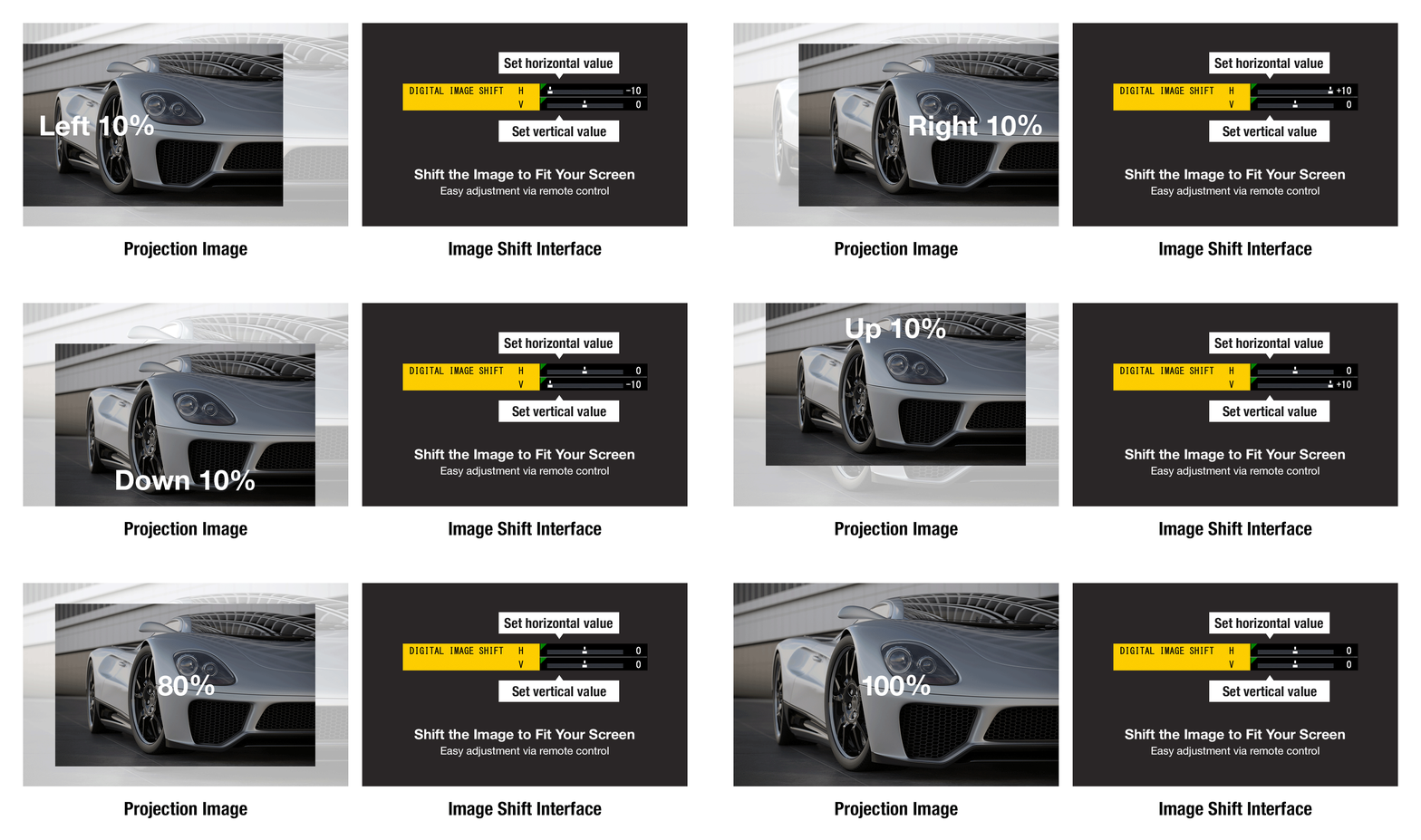
If it’s not possible to install your CMZ50 projector in the optimal position, the Digital Zoom Extender and Digital Image Shift functions may be useful. In addition to digitally adjusting the image size so it fits on the screen, you can digitally shift the projection by up to ±10% vertically and up to ±10% horizontally. The image position and size can be flexibly changed to fit your screen without touching the projector.
Wall Mount Saves Your Time and Resources
Optional ET-WBC100 hardware is available for wall-mount projection. The hardware is partially pre-assembled, reducing the number of screw points and the time and effort required for installation. Its lightweight design minimizes the burden during installation. In addition to sliding back and forth, left and right, and up and down, a dial provides ±5° vertical and horizontal tilt adjustment and ±5° of horizontal rotation adjustment. Corrections can be maintained after adjustment without needing a separate locking adjustment screw, allowing for quick and precise adjustment.

Additional Features
- Built-in 10 W speaker, mic input, audio output, and shutter function
- DICOM Simulation Mode
- Supports PJLink™, Crestron Connected™, and AMX® DD
- Control emulation function
- Free 360° installation
- ECO Management System
- Presentation Support System